

By Vinicius Flores, PhD
Marketing Communications Manager · PhD in Communication
An AI tool can summarize a stack of reports in seconds. It can also hand you a perfectly formatted citation for an article that was never published. For librarians deciding how far to trust these tools, it helps to understand why both happen.
In Becoming an AI Superuser in Libraries: Where to Start, What to Work On, a Bibliotheca webinar held Sept. 23, 2026, Migell Acosta, director of San Diego County Library, explained how large language models work and demonstrated projects he has built with them, from researching policies across California’s public libraries to organizing newsletters and searching historical archives. Lisa Stamm, Senior Solution Consultant at Bibliotheca, hosted the session.
Acosta is in his 10th year leading San Diego County Library and has spent 35 years in the profession. He began his career at the RAND Corporation Library and later worked at Santa Monica Public Library and LA County Library, where he served as Assistant Director and Chief Information Officer. He is also President-Elect of the California Library Association.
Most of what he presented came from independent experiments and from projects connected to his work with the association. He clarified that these were not implementations at San Diego County Library, where access to AI tools remains limited.
Acosta’s case was that librarians start with an advantage. Assessing sources, organizing collections, running a reference interview, and checking whether an answer holds up are the same skills that make AI useful, as long as the people using it understand what the technology can and cannot do.


Migell Acosta, Director of San Diego County Library, presented the webinar, hosted by Lisa Stamm, Senior Solution Consultant at Bibliotheca.
Why AI Makes Up Citations
A large language model, or LLM, does not look anything up. Unlike a catalog, it has no index and no store of records to consult. It generates text by predicting one token at a time, a token being a word, part of a word, or a punctuation mark. That is how a model can produce a journal citation with author, title, year, and page numbers for an article that does not exist.
Acosta showed the two processes side by side: a database search that returns a real record, and a model assembling a citation piece by piece, each part chosen because it was statistically plausible. The fabricated details looked no different from the accurate ones, because the model produced them in exactly the same way.
“Hallucination is not a flawed prediction,” he said. “It’s what prediction looks like when the prediction isn’t true.”
That is why telling a model not to hallucinate doesn’t work, and why Acosta doesn’t expect a better prompt or a newer model to solve the problem. What solves it is verification, which he described as the profession’s core competence.
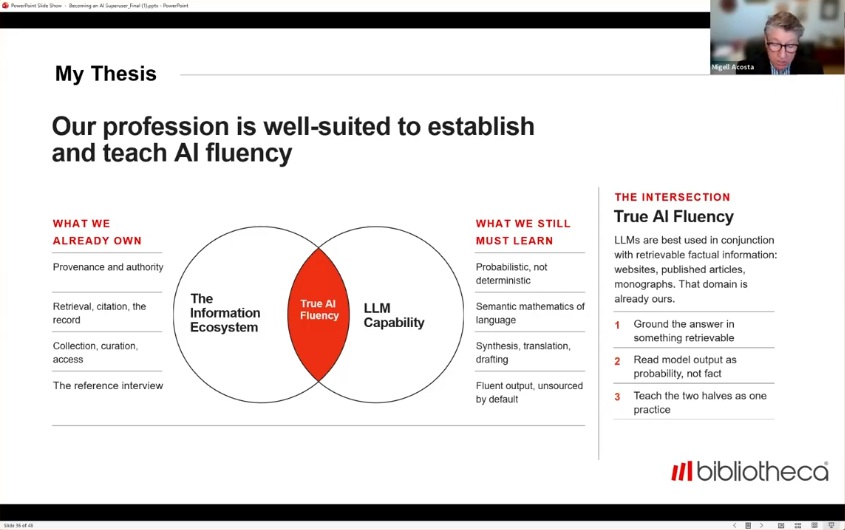
Acosta’s thesis: AI fluency sits where librarians’ expertise in sources and retrieval meets what language models can do.
Why AI Forgets: The Context Window
The context window is the model’s working memory, and it has a limit. Language models are also stateless, meaning they don’t remember a conversation. With each new message, the application sends the whole exchange back to the model to be read again from the start.
As a conversation grows, it fills the window. Many products then compress the earliest turns into a summary, and eventually the oldest turns drop out entirely. That is when a long chat starts drifting from the instructions given at the beginning.
Acosta’s fix is to start a fresh conversation. On long projects, he first asks the AI to write a handoff prompt with the background, decisions, and open tasks, then pastes it into the new session. Some of his projects have gone through dozens of these handoffs.
He also suggested learning how each product stores memories and saved instructions, and revisiting them when a new model arrives, since the newer model may already do what an old instruction was compensating for.
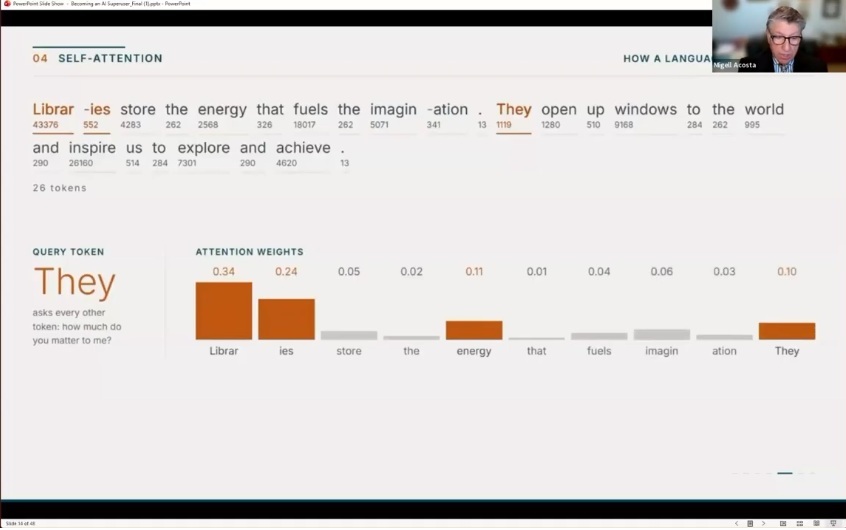
A model never reads words, only numbered tokens. Here, “They” works out that it refers to “libraries.”
What Is an AI Agent?
Acosta walked through an acquisitions task to show what an agent actually does. The goal was a purchase list of the titles with the longest holds queues, under $500.
The model itself can only read and write text. It can’t search a catalog or save a file. The software around it, which engineers call the harness, does that work. The model writes a request to search holds for titles with five or more holds per copy, and the app checks whether that action is allowed, runs it, and adds the result to the context window. The model reads everything again and decides the next step: look up prices, then save a draft. Because saving changes a file, the app stops and asks a person to approve it.
In his example, the loop ended with nine titles totaling $482. The other five didn’t fit the budget, and the list was still a draft for staff to review.
Acosta urged attendees to set aside the science-fiction picture of AI with a will of its own. An agent can do only what its tools and permissions allow, and the people who grant those permissions remain accountable.
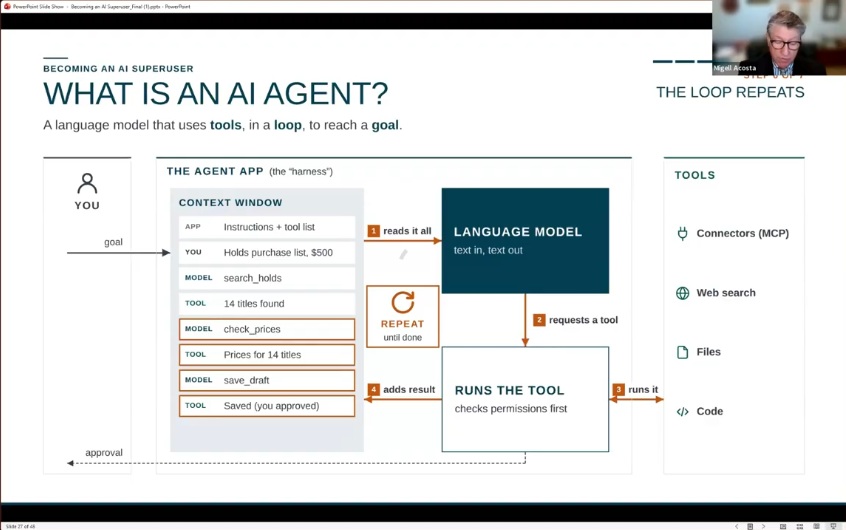
An agent is a language model that uses tools in a loop to reach a goal. The app, not the model, runs each tool.
Writing Better AI Prompts
Acosta rarely opens by asking for a finished product. His prompts usually start with “Let’s collaborate on…” followed by what he is trying to do and the documents or websites he wants the AI to consider.
“An LLM knows a lot about the world, but it knows nothing about your world,” he said.
When a topic is outside his expertise, he says so, which prompts the AI to raise assumptions he might miss. While drafting a white paper, he wanted to cite a passage he half-remembered about access to learning in California’s constitution. Admitting he didn’t know early state history led to the discovery that the language came from the state’s second constitution.
He always asks for clarifying questions and recommendations, because AI tools tend to do what they’re told and rarely suggest a different approach on their own. After a long back-and-forth, he also asks which prompt would have gotten him there faster, and saves it for next time.
He recommended learning Markdown, the plain-text format AI tools read most easily, for notes, instructions, and reusable documents.
5 AI Use Cases for Librarians
Acosta’s examples run from statewide research to a personal side project. The last one comes from the California State Library.
184 Library Policies in 20 Minutes
The California Library Association was working with the state legislature on a bill that would set rules for library cards for 16- and 17-year-olds, and it needed to know what California libraries already did. The usual approach would be to survey a handful of jurisdictions and extrapolate.
Instead, Acosta took a California State Library spreadsheet listing all 184 library jurisdictions and their websites. An AI agent searched each site for the relevant policy, ranked how reliable each finding was, and grouped the results into policy types. It split the work among 20 subagents and delivered a report in about 20 minutes.
He has since used Institute of Museum and Library Services data on more than 9,000 U.S. library jurisdictions the same way. “Agents don’t get tired and they don’t mind work,” he said.
One Source File, Many Outputs
Acosta calls this approach “write once, project onto many surfaces.” Staff build a single Markdown file, such as library_profile.md, covering the library’s services, resources, hours, staffing, budget, and other details, working it out with an AI agent, colleagues, and stakeholders. From there, the AI can produce a trustee briefing, a webinar deck, a newsletter, a social post, or a school flyer in Spanish, at whatever reading level the audience needs.
Asking AI for a one-off Word document or social post produces something used once, he noted. A well-maintained source file can be reused every time a new request comes in.
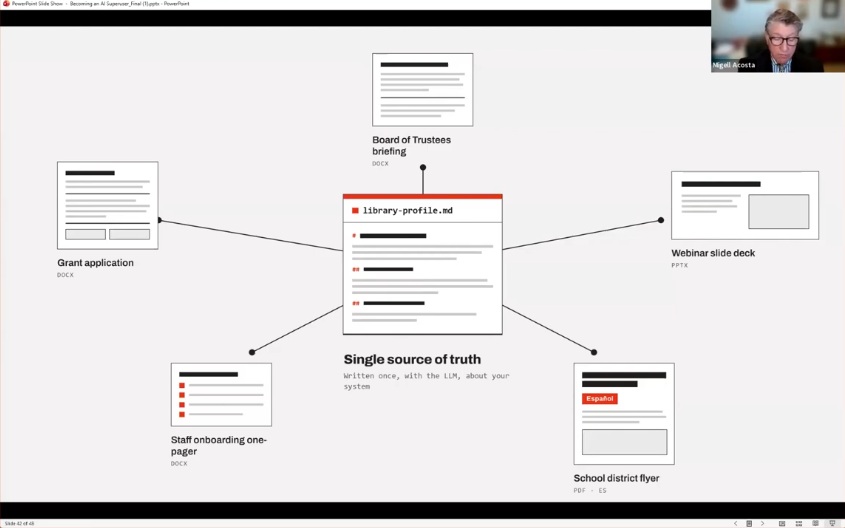
One Markdown file about the library feeds a board briefing, a grant application, a flyer in Spanish, and more.
A Newsletter Dashboard
Acosta subscribes to Marshall Breeding’s Library Technology through an email account reserved for an AI agent. Using Claude Cowork, he built a dashboard that reads each day’s issue and sorts the announcements by the topics, tools, and vendors he tracks. It also gives him a Friday summary, an idea the AI proposed when he asked it for recommendations.
The same setup could filter job lists by region or title, help HR compare salaries and qualifications, or show how other libraries describe a position someone is creating. Acosta stressed that dashboards like this are for personal use, not for republishing someone else’s content.
A Website Without Code
Acosta built AI4Librarians.org after deciding PowerPoint couldn’t handle the interactive illustrations he wanted for the webinar. He opened a free Cloudflare account, registered a domain for about $8 a year, set up a design system with colors and fonts, and had an AI agent build the site on an open-source content management system that Cloudflare designed to be run by AI agents. He never wrote an HTML tag.
The site took about 12 days and roughly eight hours of his own time. He was clear that this isn’t a way to build a library’s official website. He sees it as an option for portfolios, hobbies, or a virtual book club.
Searching an Archive by Meaning
The last example came from the California State Library’s Gold Rush collection, where the collection’s archivist and an AI expert built a discovery tool using retrieval-augmented generation, or RAG. Prospectors often wrote about “the yellow stuff” rather than gold, so a keyword search would miss those letters. RAG matches meaning, and the search finds them.
What Acosta most admired was how the results are presented. Each answer is split into evidence, interpretation, and limits, a format designed by the archive’s subject experts. Users can ask questions in plain language and still see what the documents say, how they were read, and where the conclusions stop.
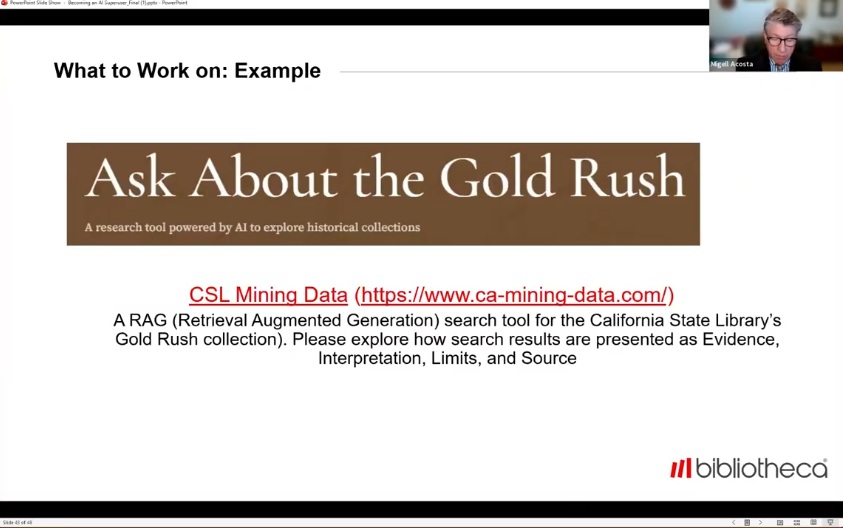
The California State Library’s Gold Rush tool presents each result as evidence, interpretation, limits, and source.
AI FAQ for Librarians
How should libraries explain AI hallucinations to the public?
As expected behavior, not a malfunction, Acosta said. A language model is an enormous mathematical system for producing language, and without specific references to work from, it will sometimes produce things that aren’t true. Libraries can turn that around by starting with structured data, which is their territory, and using the model to interpret, categorize, or translate it.
How can you make AI answers more reliable?
Acosta called reliability a tough question, since models are built to give plausible answers. He often pairs the model with live web search restricted to specific domains, and his saved instructions tell the AI not to be a sycophant and to push back on his ideas. When unsure, he asks directly whether an answer came from training data or from a live search. While researching patron privacy laws, that question got the AI to acknowledge it was citing laws from its training and to recommend checking the actual sources.
What if colleagues don't want to use AI?
Asked about staff with concerns about jobs, accuracy, privacy, or ethics, Acosta said he never tries to persuade anyone. “I would never require anybody to use AI,” he said. His own view is that bad actors will use AI regardless, and he would rather apply it to good ends.
Why does AI miss headings in PDFs and Word documents?
In Word, text that is bold and centered only looks like a heading. Built-in heading styles give the document a structure AI can read. PDFs with tables can come out garbled, so Acosta suggested converting them to Markdown first and feeding in only the relevant part.
“Our budget is 900 pages long,” he said. “Don’t give it the whole thing if you only want one chapter.”
Where to Start With AI
Acosta chose a few major platforms and learned them deeply rather than spreading himself across every tool. Free accounts are enough to build fluency, though heavier projects bring usage limits and token costs into play. Experienced users manage those costs through orchestration, using the newest, most expensive model to plan the work and cheaper models to carry out the pieces.
His advice for anything unfamiliar is to ask the AI itself. Models are trained on their own documentation, and questions about how they work, how they store memories, or why they got something wrong often get a useful answer.
Get the Recording
The full session includes Acosta’s explanations of language models, context windows, hallucinations, and agents, his project demonstrations, and the audience Q&A on reliability, bias, staff concerns, and PDFs. More examples and resources are available at AI4Librarians.org.
Fill out the form below to watch the recording.
SHARE THIS ARTICLE

You may also Like
Insights + Trends
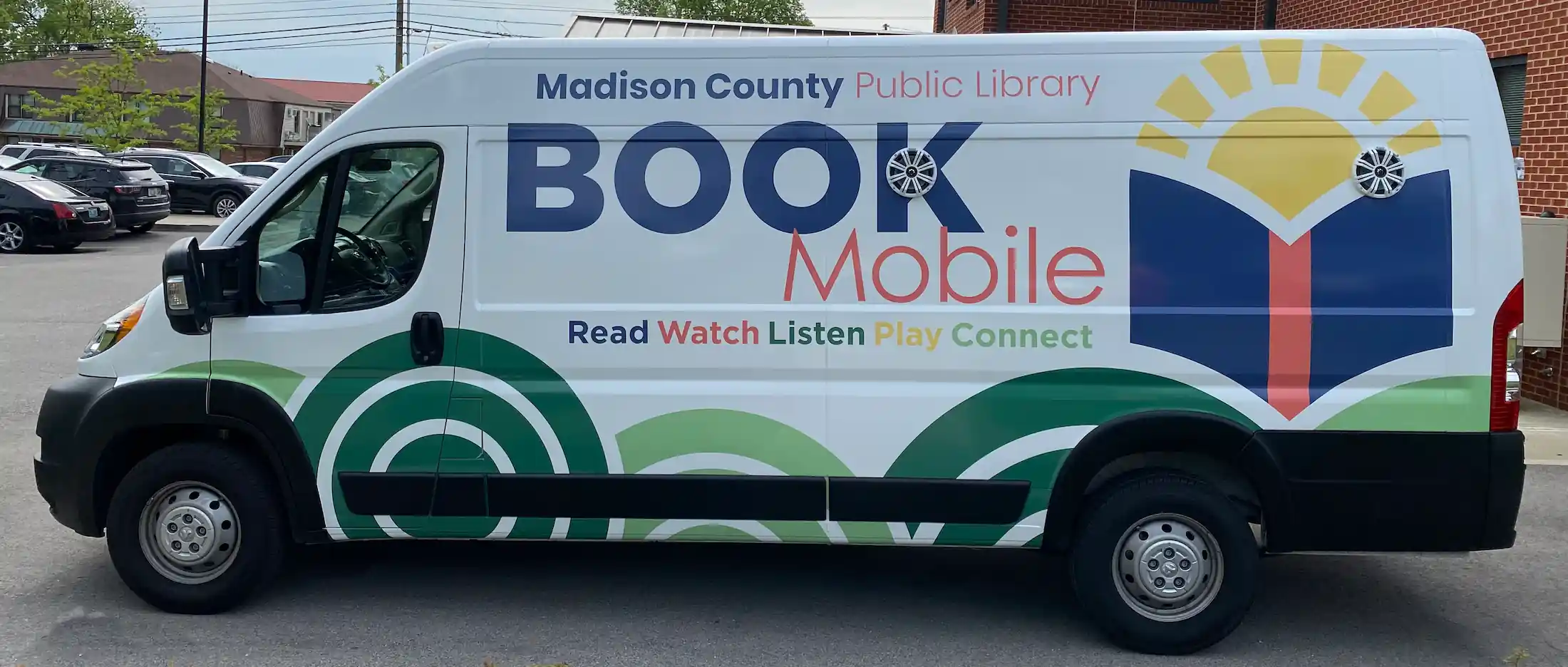
Expanding community access with RFID, remoteLocker+, and cloudCheck tablet: Madison County Public Library
With Bibliotheca RFID running from the selfChecks to a rural school locker, Madison County Public Library grew physical book circulation 20%.

Embedding Art into Library Architecture: Designing Spaces to Engage and Showcase Community Creativity
Discover how art and architecture transform libraries into vibrant, creative spaces that inspire connection, engagement, and community collaboration.

Customer Training: Hot Topics in quickConnect and System Manager
Learn how to personalize receipts, promote library events, add seasonal messages, and explore new patron preference settings.