

By Alini Garcia
Sr. Marketing Manager
Library technology is often managed in pieces. Device status may be checked in one place, reports pulled from another, configuration changes made directly at a kiosk, and support issues investigated only after someone notices something is wrong.
libraryConnect LINK brings device health, reporting, configuration, and alerts for connected Bibliotheca equipment into one platform. Library teams can see what is happening across their systems, identify issues earlier, and manage changes without moving between separate workflows.
In our recent customer training, libraryConnect LINK for Faster, Smarter Daily Operations, Mason Humphrey, Commercial Director; Lynn Yandell, Solution Consultant; and James Green, Product Manager at Bibliotheca, demonstrated libraryConnect LINK in a live environment. They covered device monitoring, reporting, remote configuration, alerts, mobile access, and new AI functionality.
A Clearer View of Library Equipment
The webinar began with the libraryConnect LINK dashboard, using a live library environment to show how connected Bibliotheca equipment can be monitored from a central view.
From the dashboard, staff can open Device Health to see equipment status across the system and investigate anything that needs attention.
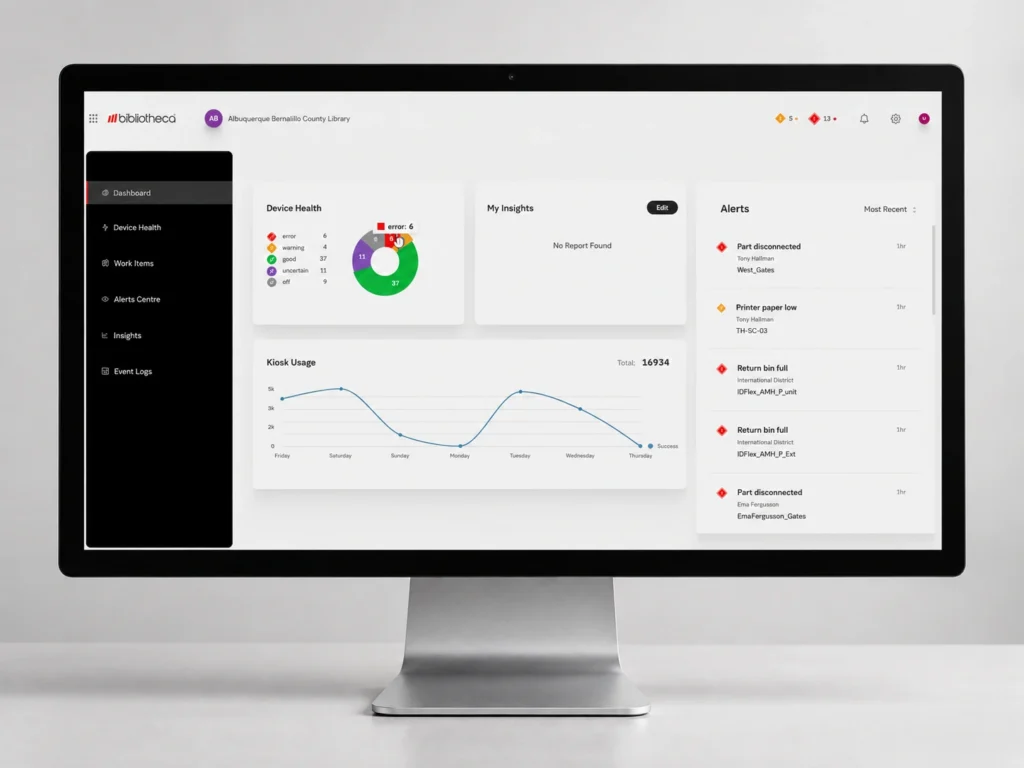
Device Health lets staff move from the broader system view to a specific branch, device, or component. During the demonstration, one selfCheck was reporting low printer paper while an automated materials handling (AMH) system showed a full return bin.
For libraries with equipment across multiple locations, this makes it easier to catch small issues before they interrupt service.
Reporting sits within the same platform. Libraries can review selfCheck activity, footfall, transactions, and other available data, then save regularly used reports in My Insights.
During the session, a report covering the previous month’s selfCheck activity was saved and scheduled to run automatically on the first day of each month. Reports can also be sent to other staff, removing the need to rebuild and redistribute the same information each reporting period.
Staff can view traffic data as raw figures or as a graph, which can help them spot patterns such as busy days or changes in activity around a program or event.
Managing Changes Across Multiple Devices
libraryConnect LINK also gives libraries a central way to manage supported configuration changes across compatible devices.
The webinar demonstrated this with quickConnect. Settings that might otherwise be changed directly at an individual selfCheck can be updated in libraryConnect LINK and applied to other compatible devices.
These include receipt settings, home screen content, workflow options, and promotions. Bibliotheca’s beta partners identified these as some of the settings they most often wanted quicker access to.
Lynn demonstrated the process by changing a receipt setting in the training environment and selecting additional selfChecks to receive the same update.
One change can be made centrally and applied to multiple compatible devices instead of repeated machine by machine.
Alerts That Reach the Right People
As the number of devices grows, alerts are most useful when they reach the staff best placed to respond.
libraryConnect LINK allows libraries to configure notifications around staff roles and responsibilities.
Frontline staff might receive a warning that receipt paper is running low. An IT team could receive a notification when the ILS is offline or a component becomes disconnected.
Alerts can be delivered by email, SMS, or through a banner within libraryConnect LINK, giving libraries control over which teams receive which information.
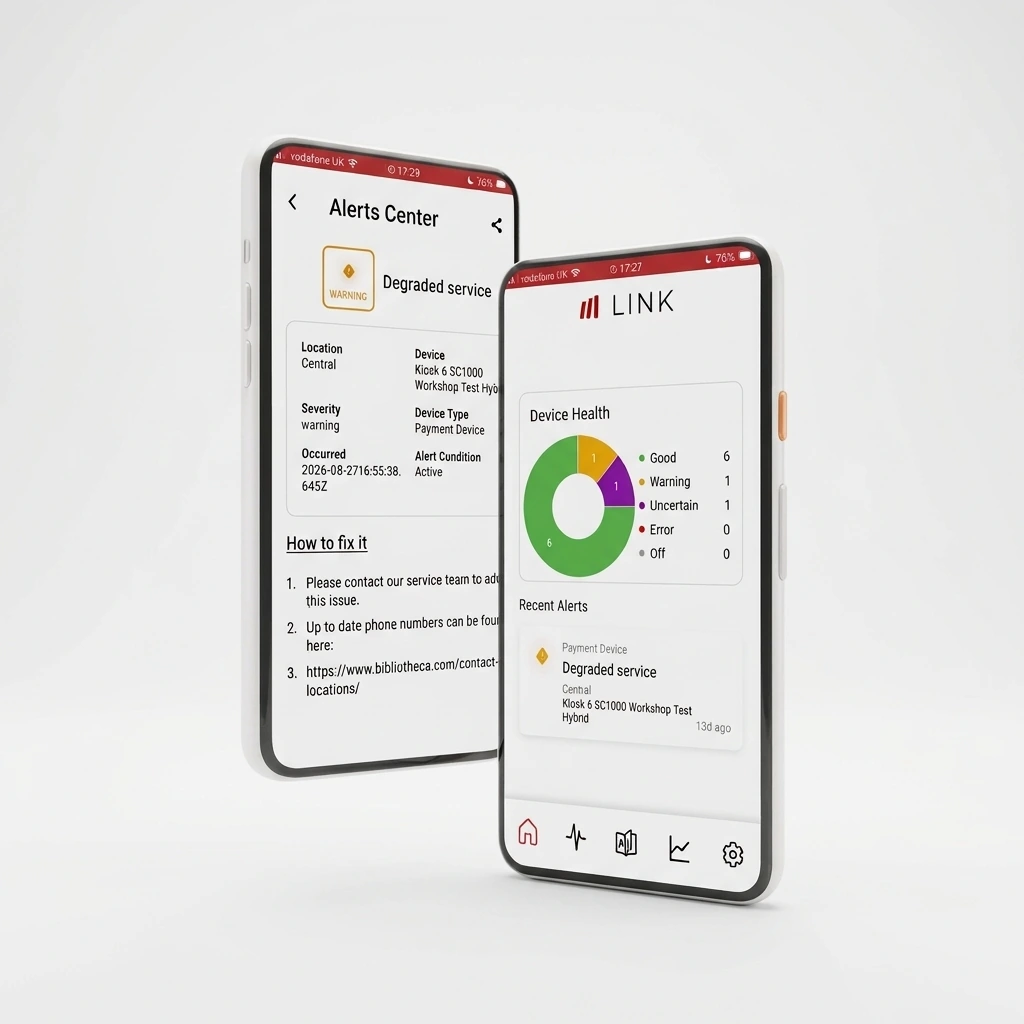
The libraryConnect LINK mobile app focuses on the information staff are more likely to need away from a desk, including device health, alerts, saved insights and support information. It is not intended to reproduce the full browser experience on a smaller screen.
Faster Troubleshooting with Fix-It
One mobile feature demonstrated was Fix-It, which adds context to device alerts and gives staff guidance on what to do next.
For issues that can be handled locally, the app can provide a short explanation and suggested action. The webinar used low receipt paper as an example of a common problem frontline staff should be able to resolve without opening a support case.
When an issue requires Bibliotheca Support, staff can share the device details directly from the app.
That matters because library staff may identify a machine by its location or appearance, while the support team sees it under a specific device name or ID. Sharing the device information directly gives both sides the same equipment record and issue context from the start.
Making Library Data Easier to Use
libraryConnect LINK gives libraries different ways to access operational data depending on the question they need to answer.
With My Insights, staff can save reports they use regularly, such as monthly selfCheck activity or footfall, and return to them without rebuilding the report each time.
Other questions are less predictable. Staff may need an answer during a meeting, after an event, or in response to something they hadn’t planned to report on.
James gave the example of someone asking during a meeting whether attendance increased after a library event. Answering that question might normally mean leaving the meeting, pulling the relevant data, working with it separately, and returning with an answer later.
AI Insights provides another way to query that data.
James first asked how many borrows had taken place the previous day. Before returning a result, libraryConnect LINK asked for clarification about the timeframe and whether the request covered one branch or the entire organization.
He then asked for footfall by day across all branches for the previous seven days. libraryConnect LINK returned the information as both a table and a chart that could be shared or used elsewhere.
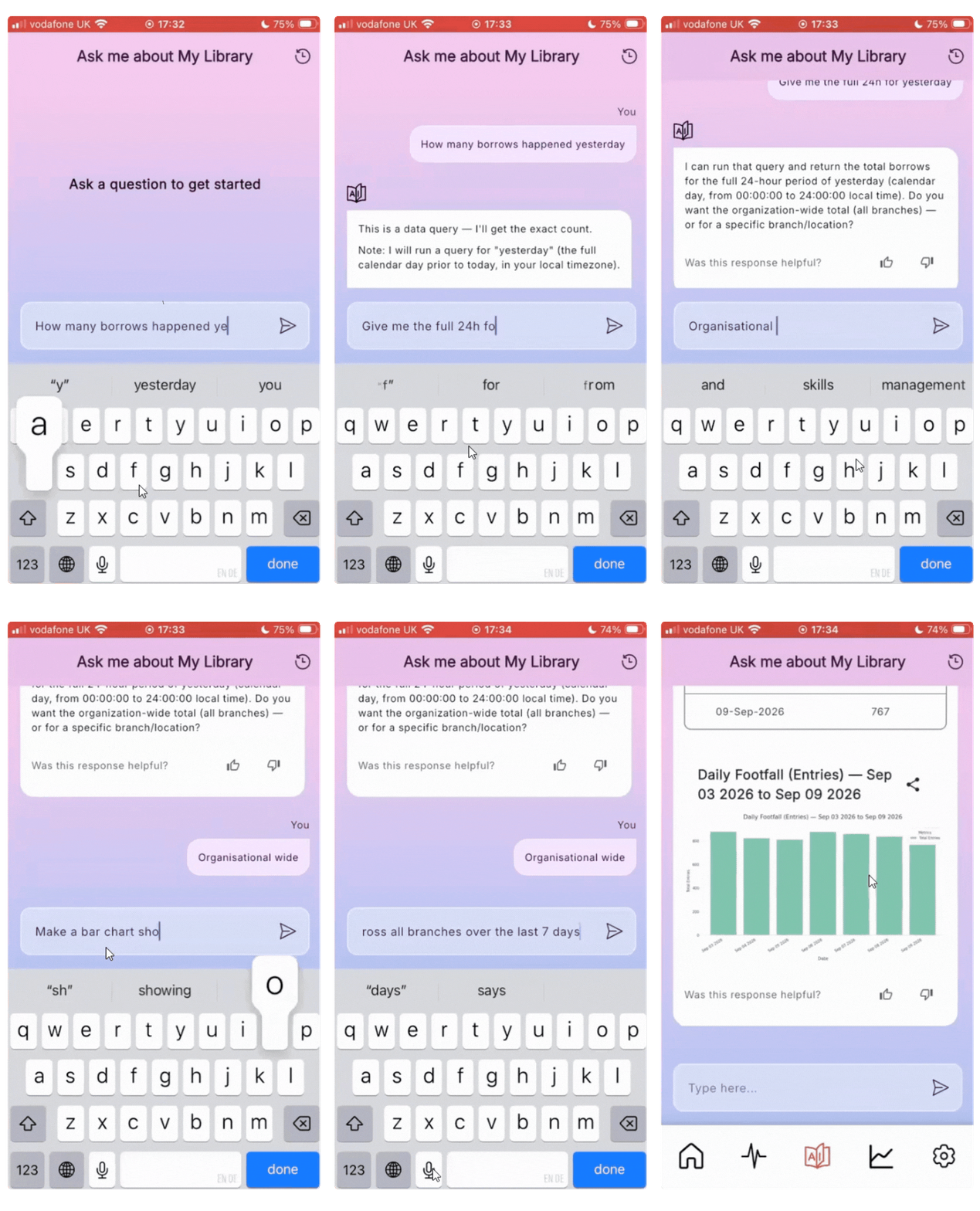
Video: AI Insights in use within libraryConnect LINK.
How libraryConnect LINK Approaches AI, Accuracy and Data Privacy
The AI demonstration also raised two practical questions: How reliable are the answers, and what data does the AI actually have access to?
In libraryConnect LINK, AI is not used to make operational decisions on behalf of library staff. Its role is to interpret a question and make existing LINK data easier to query.
Staff can also check the results against the underlying data. If someone asks how many items were borrowed yesterday, the answer can still be verified in the corresponding libraryConnect LINK report.
James also explained how data is handled.
The AI is not given unrestricted access to the full libraryConnect LINK database. Instead, it receives information about how the database is structured and uses the staff member’s question to determine which query to run.
libraryConnect LINK runs that query against the data. The result can then be passed back to the AI to format as a response, table or chart.
The AI is therefore used for a specific query rather than being given open access to the wider data environment.
Bibliotheca explored the policy side of AI in more depth in a recent webinar, AI Policy in Libraries: Firsthand, Frontline Examples, where library professionals discussed policy development, staff buy-in and community expectations.
Watch the Full Session
The full recording includes the libraryConnect LINK walkthrough, Device Health and reporting, remote configuration, alert management, the mobile app, Fix-It, AI Insights, and audience Q&A.
Watch the full session on demand to see libraryConnect LINK in use across device management, troubleshooting, and operational reporting.
Share this article

You may also Like
Insights + Trends

AI for Librarians: Where to Start and 5 Real Use Cases
The skills behind a good reference interview are the same ones that make AI useful. A library director shows how, with five projects you can borrow.
RFID in Libraries: What It Is and What It Changes
Learn what RFID tags contain, what it takes to convert a collection, and what libraries should consider for checkout, security, and inventory.
Customer Training | Bibliotheca Academy: Unlocking the Full Potential of your Bibliotheca Products
Discover Bibliotheca Academy, our new Learning Management System designed to help library teams access training, build product knowledge, and get more from their Bibliotheca solutions.