

quickConnect
The platform that connects everything your library offers
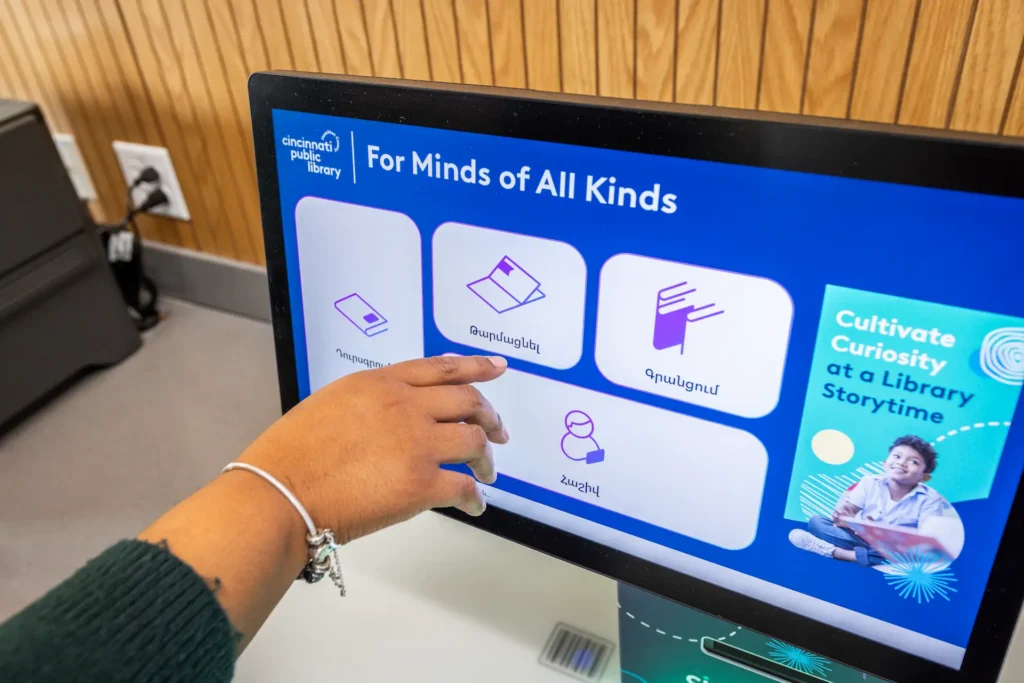
What quickConnect can do
Everything users expect, at the kiosk
Borrow. Return. Pay fines. Discover new reads. Register for events. Reserve a room. Navigate the building.
quickConnect brings more of the library experience to your self-service kiosks, combining borrowing, discovery, payments, reservations and connected services in one intuitive interface. By making more services available through self-service, staff have more time to focus on meaningful customer interactions, community engagement and delivering high-value library services.
Real-time ILS integration
Checkouts, returns, fine management, and account updates sync instantly with your integrated library system (LMS). Compatible with leading providers worldwide.
Every way patrons pay
Stripe, Apple Pay, Google Pay, PayPal, card, and cash. Fines, fees, and donations processed securely at the kiosk or via QR code.
Accessible by design
74 languages, text-to-speech, adjustable fonts, and high-contrast themes help more users use self-service independently.
Built-in wayfinding
Users get personalised directions at the selfCheck screen. Multilingual wayfinding powered by uniFi+, with language preference passed automatically from the user session.
SMS receipts and alerts
Instant, internet-free SMS receipts and alerts reduce paper waste and give patrons a record they can actually use.
Secure at every step
Designed to support ADA, GDPR, and PCI DSS requirements. Encrypted transactions, session timeouts, and secure staff login. Approved for use by the U.S. Department of Defense.
ACCESSCONNECT
Everything your library offers, at the kiosk
With accessConnect, libraries can bring supported third-party services directly into the quickConnect interface: event registration, surveys, catalog search, room reservations, and PC bookings.
One scan, full access. Users can move seamlessly from selfCheck into connected services with no additional login required.
Available as an add-on for existing customers.
- Event registration
- Program discovery
- Surveys and patron feedback
- Library catalog search
- Room and resource reservations
- PC and workstation reservations
Built for every user,
from day one
At Bibliotheca, we believe inclusive libraries start with inclusive technology. That’s why we design self-service solutions that work for everyone: from first-time visitors and multilingual communities to older adults, families and people with additional accessibility needs. Because every library user deserves an experience that’s simple, intuitive and welcoming.
Every transaction available in every patron’s language. No request needed.
Spoken guidance through every step. Screen reader support, high-contrast themes, large touch targets, and tactile navigation controls.
AudioNav
74 languages and regional variations are included at no additional cost. Libraries can also customise language files or create localised variations.
Language flexibility
Simple, consistent workflows help users complete transactions confidently without hidden menus or unnecessary complexity. With rememberMe, returning users can automatically restore their preferences.
Powered by rememberMe
Height-adjustable hardware and reachable touchscreens help create a more comfortable experience for children, wheelchair users, and users with different mobility needs.
Hardware options
EXCLUSIVE TO BIBLIOTHECA
NoveList at checkout
quickConnect does more than streamline borrowing. It helps library users discover more from their library by presenting relevant recommendations and services at the point of checkout. Users can reserve titles, explore related resources and continue their reading journey—all through one intuitive self-service experience.
NoveList is a division of EBSCO Information Services.

ALL INTEGRATIONS
Works with the systems
your library already uses
DIGITAL DISPLAYS
uniFi+
Library-branded digital displays, promotions, and wayfinding on every screen.
libraryConnect LINK
Create a message or promotion once and distribute it automatically across every quickConnect-powered device in the library estate.
EVENTS
Communico
Event promotions created in Communico display directly at selfCheck stations.
LocalHop
Users browse, share, and print event details directly from the kiosk.
LibCal
LibCal event calendar syncs automatically with selfCheck stations.
LibraryCalendar
Interactive event calendar with QR code registration at the kiosk.
CONTENT
cloudLibrary
Browse, preview, and place holds on digital titles directly from selfCheck.
NoveList
Curated book recommendations from EBSCO delivered directly at checkout.
Built for libraries, by libraries.
For more than 30 years, Bibliotheca has worked alongside libraries to continually improve the self-service experience. Every enhancement to quickConnect is shaped by customer feedback, ensuring it evolves to meet the changing needs of libraries and their communities. Over the past three years alone, we’ve delivered more than 20 major enhancements, strengthening accessibility, user experience, integrations, security and overall performance.
GO DEEPER
See quickConnect in practice, on demand
Recorded training sessions from the Bibliotheca team showing how libraries use quickConnect every day.
Already a Bibliotheca customer?
Two ways we can help you get more
from quickConnect
Upgrade to the latest version
New features ship regularly, including accessibility improvements and stronger integrations. Support can walk you through the upgrade path.
Extend what your kiosk can do
Add accessConnect, integrate with more of your library’s tools, or activate features your current setup does not include yet.
Frequently asked questions
quickConnect integrates seamlessly with a wide range of Library Management Systems (LMS) used by libraries across the UK and worldwide. With decades of experience delivering reliable library system integrations, Bibliotheca’s expert team can help confirm compatibility with your existing system as part of the evaluation process.
Security and privacy are built into every quickConnect interaction. Designed to support GDPR and PCI DSS requirements, quickConnect automatically ends and clears user sessions after each transaction, while encrypted payment processing helps protect sensitive data every step of the way.
Yes. Libraries can apply custom themes, logos, color schemes, and on-screen messaging to the quickConnect interface. The same branding is carried consistently across every Bibliotheca device the library uses, so the patron experience is coherent at every touchpoint. An on-demand webinar is also available with practical examples of how libraries use these customization tools.
Updates are delivered remotely by Bibliotheca and do not require on-site visits or manual installation by library staff. Bibliotheca has delivered more than 20 major improvements to quickConnect in the last three years alone. Library feedback informs quickConnect’s ongoing development alongside product roadmap priorities.
quickConnect includes offline resilience capabilities that allow the kiosk to continue processing core transactions, such as checkouts and returns, during a network interruption.
quickConnect is designed to make self-service accessible to more people. Features such as AudioNav spoken guidance, adjustable text, high-contrast display options and tactile navigation controls help create an inclusive experience, enabling more users to access library services independently and with confidence.
quickConnect supports contactless card, chip and PIN, cash and coin, Apple Pay, Google Pay, PayPal, and QR codes.
Bibliotheca Academy gives library staff the flexibility to learn at their own pace. On-demand training for quickConnect and System Manager is available anytime, complemented by regular live sessions with our training team to answer questions and provide ongoing support.

See quickConnect in action
Talk to our team about expanding what self-service can do at your library.