

quickConnect
The platform that connects everything your library offers
What they can do
Everything patrons expect, at the kiosk
Borrow. Return. Pay fines. Discover new reads. Register for events. Reserve a room. Navigate the building.
quickConnect brings more of the library experience into the kiosk, from everyday transactions to discovery, payments, reservations, and connected services. For staff, that means more time for programming, outreach, and higher-value patron support.
Real-time ILS integration
Checkouts, returns, fine management, and account updates sync instantly with your integrated library system (ILS). Compatible with leading providers worldwide.
Every way patrons pay
Stripe, Apple Pay, Google Pay, PayPal, card, and cash. Fines, fees, and donations processed securely at the kiosk or via QR code.
Accessible by design
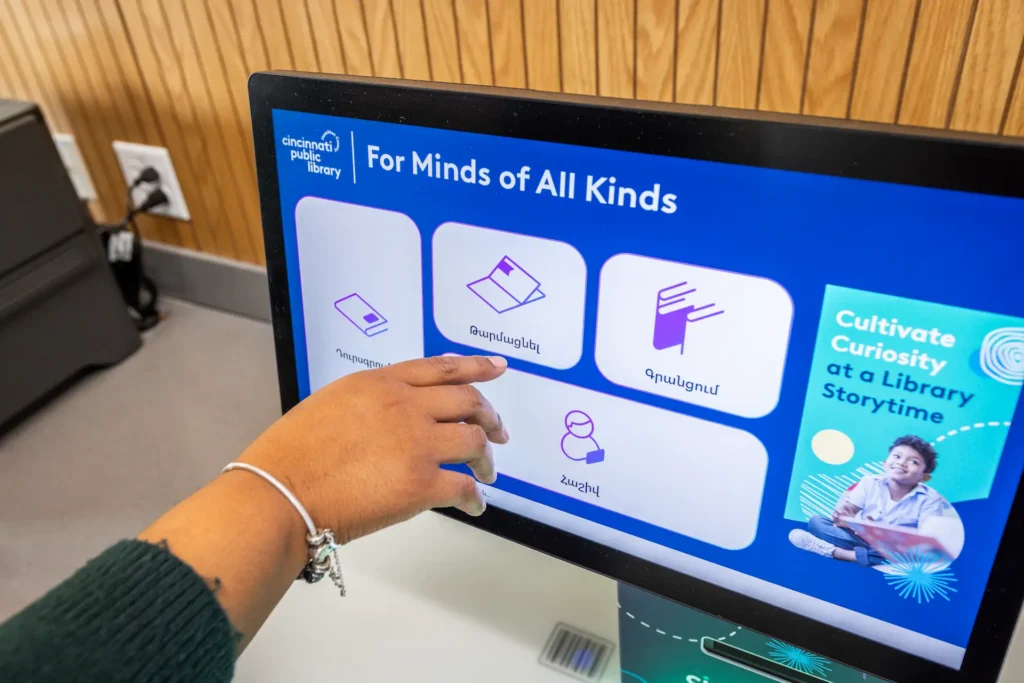
74 languages, text-to-speech, adjustable fonts, and high-contrast themes help more patrons use self-service independently.
Built-in wayfinding
Patrons get personalized directions at the selfCheck screen. Multilingual wayfinding powered by uniFi+, with language preference passed automatically from the patron session.
SMS receipts and alerts
Instant, internet-free SMS receipts and alerts reduce paper waste and give patrons a record they can actually use.
Secure at every step
Designed to support ADA, GDPR, and PCI DSS requirements. Encrypted transactions, session timeouts, and secure staff login. Approved for use by the U.S. Department of Defense.
ACCESSCONNECT
Everything your library offers, at the kiosk
With accessConnect, libraries can bring supported third-party services directly into the quickConnect interface: event registration, surveys, catalog search, room reservations, and PC bookings.
One scan, full access. Patrons can move seamlessly from selfCheck into connected services with no additional login required.
Available as an add-on for existing customers.
- Event registration
- Program discovery
- Surveys and patron feedback
- Library catalog search
- Room and resource reservations
- PC and workstation reservations
Built for every patron,
from day one
For Bibliotheca, inclusivity goes beyond accessibility standards. It means designing self service for the full range of people who walk through a library’s doors. First time visitors. Patrons whose first language is not English. Older adults new to touchscreens. Patrons using screen readers. Patrons using mobility aids. Parents carrying children.
Every transaction available in every patron’s language. No request needed.
Spoken guidance through every step. Screen reader support, high contrast themes, large touch targets, and tactile navigation controls.
AudioNav
74 languages and regional variations are included at no additional cost. Libraries can also customize language files or create localized variations.
Language flexibility
Simple, consistent workflows help patrons complete transactions without hidden menus or extra steps. With rememberMe, returning users restore their preferences automatically.
Powered by rememberMe
Height-adjustable hardware and reachable touchscreens help create a more comfortable experience for children, wheelchair users, and patrons with different mobility needs.
Hardware options
EXCLUSIVE TO BIBLIOTHECA
NoveList at checkout
When a patron checks out a book, quickConnect can surface curated NoveList recommendations at the point of checkout. Patrons can place suggested titles on hold, print the list, or have it emailed for later. The right read, at the right moment.
NoveList is a division of EBSCO Information Services.

ALL INTEGRATIONS
Works with the systems
your library already uses
DIGITAL DISPLAYS
uniFi+
Library-branded digital displays, promotions, and wayfinding on every screen.
libraryConnect LINK
Create a message or promotion once and distribute it automatically across every quickConnect-powered device in the library estate.
EVENTS
Communico
Event promotions created in Communico display directly at selfCheck stations.
LocalHop
Patrons browse, share, and print event details directly from the kiosk.
LibCal
LibCal event calendar syncs automatically with selfCheck stations.
LibraryCalendar
Interactive event calendar with QR code registration at the kiosk.
CONTENT
cloudLibrary
Browse, preview, and place holds on digital titles directly from selfCheck.
NoveList
Curated book recommendations from EBSCO delivered directly at checkout.
Built for libraries, by libraries.
Bibliotheca introduced its first self-service software in 1992. Every release since then has been shaped by the libraries that use it. Customer feedback continues to guide the evolution of quickConnect, with more than 20 major improvements delivered over the past three years across accessibility, patron experience, integrations, security, and performance.
GO DEEPER
See quickConnect in practice, on demand
Recorded training sessions from the Bibliotheca team showing how libraries use quickConnect every day.
Already a Bibliotheca customer?
Two ways we can help you get more
from quickConnect
Upgrade to the latest version
New features ship regularly, including accessibility improvements and stronger integrations. Support can walk you through the upgrade path.
Extend what your kiosk can do
Add accessConnect, integrate with more of your library’s tools, or activate features your current setup does not include yet.
Frequently asked questions
quickConnect integrates with a wide range of ILS providers used by libraries worldwide, including SirsiDynix Symphony, Innovative Interfaces Sierra, Koha, Alma, Polaris, and others. Bibliotheca has decades of experience in library system integration, and the team can confirm compatibility with your specific system during the evaluation process.
quickConnect is built to support GDPR, PCI DSS, and ADA requirements. Patron sessions time out automatically and are fully cleared at the end of each interaction. Encrypted transactions protect payment data at every step. The platform has also received approval for deployment in U.S. Department of Defense library environments, one of the most demanding compliance benchmarks in the sector.
Yes. Libraries can apply custom themes, logos, color schemes, and on-screen messaging to the quickConnect interface. The same branding is carried consistently across every Bibliotheca device the library uses, so the patron experience is coherent at every touchpoint. An on-demand webinar is also available with practical examples of how libraries use these customization tools.
Updates are delivered remotely by Bibliotheca and do not require on-site visits or manual installation by library staff. Bibliotheca has delivered more than 20 major improvements to quickConnect in the last three years alone. Library feedback informs quickConnect’s ongoing development alongside product roadmap priorities.
quickConnect includes offline resilience capabilities that allow the kiosk to continue processing core transactions, such as checkouts and returns, during a network interruption. Transaction data is synchronized with the ILS once the connection is restored. Bibliotheca can advise on the best setup for your environment.
quickConnect ships with a comprehensive set of accessibility features as standard. AudioNav provides step-by-step spoken guidance for blind and low-vision patrons. The interface supports adjustable font sizes, high-contrast themes, and tactile navigation controls. 74 languages are supported with text-to-speech. The software is designed to support ADA, WCAG, DDA, and EN 301 549 standards. rememberMe stores each patron’s accessibility preferences so the kiosk is configured for them from the moment they scan their card.
quickConnect supports contactless card, chip and PIN, cash and coin, Apple Pay, Google Pay, PayPal, and Stripe QR codes. Libraries can use these to process fine and fee payments and to accept patron donations. Integration with Pharos and PaperCut adds further options for print management and patron account top-ups.
Bibliotheca offers Bibliotheca Academy, an on-demand training platform with guided learning paths and short focused modules covering quickConnect and System Manager. Staff can access training at any time without scheduling sessions. The platform also includes regular office hours with the Bibliotheca training team for follow-up questions.

See quickConnect in action
Talk to our team about expanding what self-service can do at your library.